Why we recommend ArcSolar
- Turn the bill into the next sales step. Review AI electricity bill analysis, check the inputs and build a solar and battery savings estimate.
- Keep open quotes moving with automated follow-up cadences. Prepare quotes on mobile, generate the savings estimate and send the customer’s estimate email from the same workflow.
- Keep the conversation beside the work. Use AI call intelligence to review the call, check the summary and confirm the saved follow-up task.
- Follow the job beyond the quote. Connect GreenDeal or Formbay and review rebate progress beside the project.
Sources: [4][18][5][6][7][16][20][22][23]
An early client result: ArcSolar reports almost $1.5 million in deals processed for one client in the first few months after implementation. This is deal value processed, not cash collected or a measured sales uplift. Read the result and its scope.
This is our recommendation for that workflow, based on the documented capabilities below. Plan, access and provider setup apply; a demo should confirm your exact requirements.
Compare what each platform covers
Scroll across to compare the feature detail.
| Platform | Published scope | The buying decision |
|---|---|---|
| ArcSolar | CRM, calls, quoting, jobs and finance; AI + Roof Vision on Arc. | Choose for a connected retailer operating workspace and named GreenDeal/Formbay tracking. |
| SolarHub CRM | Design, CRM, messaging and installer workflow; token-based plans. | Compare native calling, AI bill extraction and named trader evidence. |
| Pylon | Design by project; CRM as a separate per-user add-on. | Compare specialist design outputs and the complete project-plus-team cost. |
| OpenSolar | Free core design, sales and project CRM; Bridge Select STC connection. | Compare the calls, intelligence and trader workflow your team still needs. |
| PipeReply | Managed CRM/AI agents with proposal and job-tool integrations. | Choose between retaining an integrated stack and running a retailer workspace. |
| Aurora Solar | Specialist design/sales plans; advanced modelling and Enterprise integrations. | Confirm Australian scope and which system runs customer and delivery work. |
Sources: [1][2][3][24][12][26][27][28][29][11][13][5][4][6][7][21][16][20]
In ArcSolar: send SMS, make calls and review recordings, transcripts and AI summaries from the customer record. Book a demo to see the full conversation-to-quote workflow.
When the job needs more than a proposal
ArcSolar keeps the accepted offer, payment and next operational step connected. If detailed shading or electrical design is essential, confirm those outputs separately.
Look beyond the licence price
OpenSolar includes CRM and project tools. Compare the work your team still does elsewhere. ArcSolar is worth a closer look when connecting sales, payments and delivery is the priority.
Conversations, quotes and delivery together
ArcSolar brings communications, Roof Vision, AI bill analysis and savings estimates into the retailer workflow. GreenDeal and Formbay connect rebate progress to the project, so the team can follow the work beyond the sale.
Compare the full cost
Include setup, migration, usage and any tools you will keep. Bring your user count and monthly job volume to the demo so we can discuss the right ArcSolar scope.
Sources: [11]
Try one job from start to finish
Use a fictional battery customer with a revised quote, a pending deposit and a missing site photo. Ask to see the accepted version, payment status and owner of the missing item. That simple walkthrough shows whether the next person can keep the job moving.
Confirm your must-haves
This is a six-product shortlist, not a performance ranking. Confirm specialist design, Australian availability and integration requirements. ArcSolar’s roof design tools are not proof of equivalent engineering outputs.
Recordings, transcripts and AI summaries depend on enabled capture, processing and access. Review suggested actions against the saved task.
About this comparison
Published by ArcSolar. Our recommendation is for connected Australian retail operations, not an independent market ranking. The six-product table was refreshed against first-party scope and pricing sources on 5 October 2026. The linked comparisons explain the plan boundaries and specific documented gaps. This is a documentation review, not hands-on competitor testing.
Start with an ArcSolar demo
Bring one handover that takes too much chasing. We’ll show you how the customer, quote, payment and operations record connect.
Compare your shortlist
See the workflow in ArcSolar.
Explore the public demo before booking a walkthrough. These product screenshots show fictional projects and sample states; no account is required.
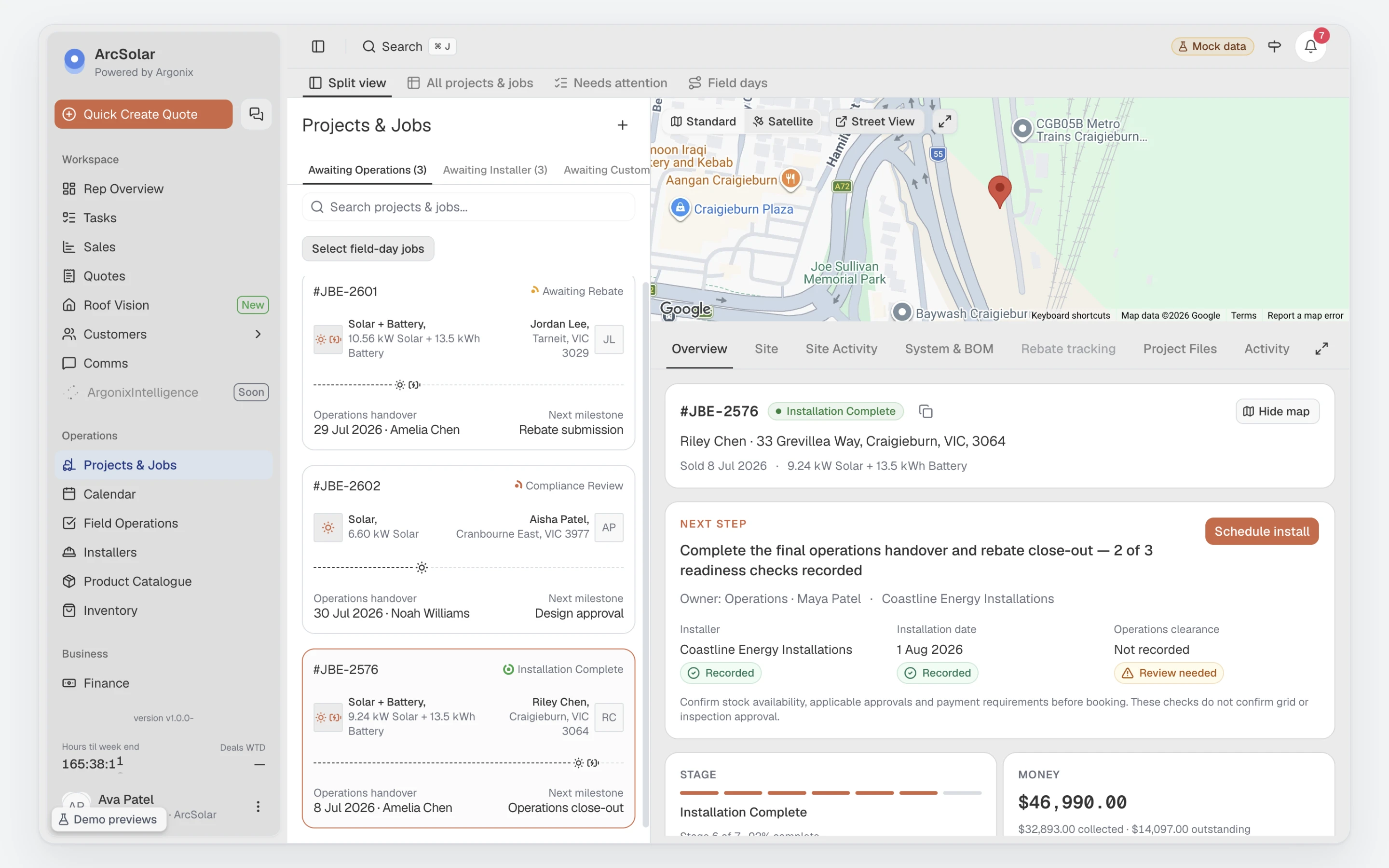
Projects & Jobs
Follow installation stages, the next action and the people responsible for moving each job forward.
Open Projects & Jobs demo (opens in a new tab)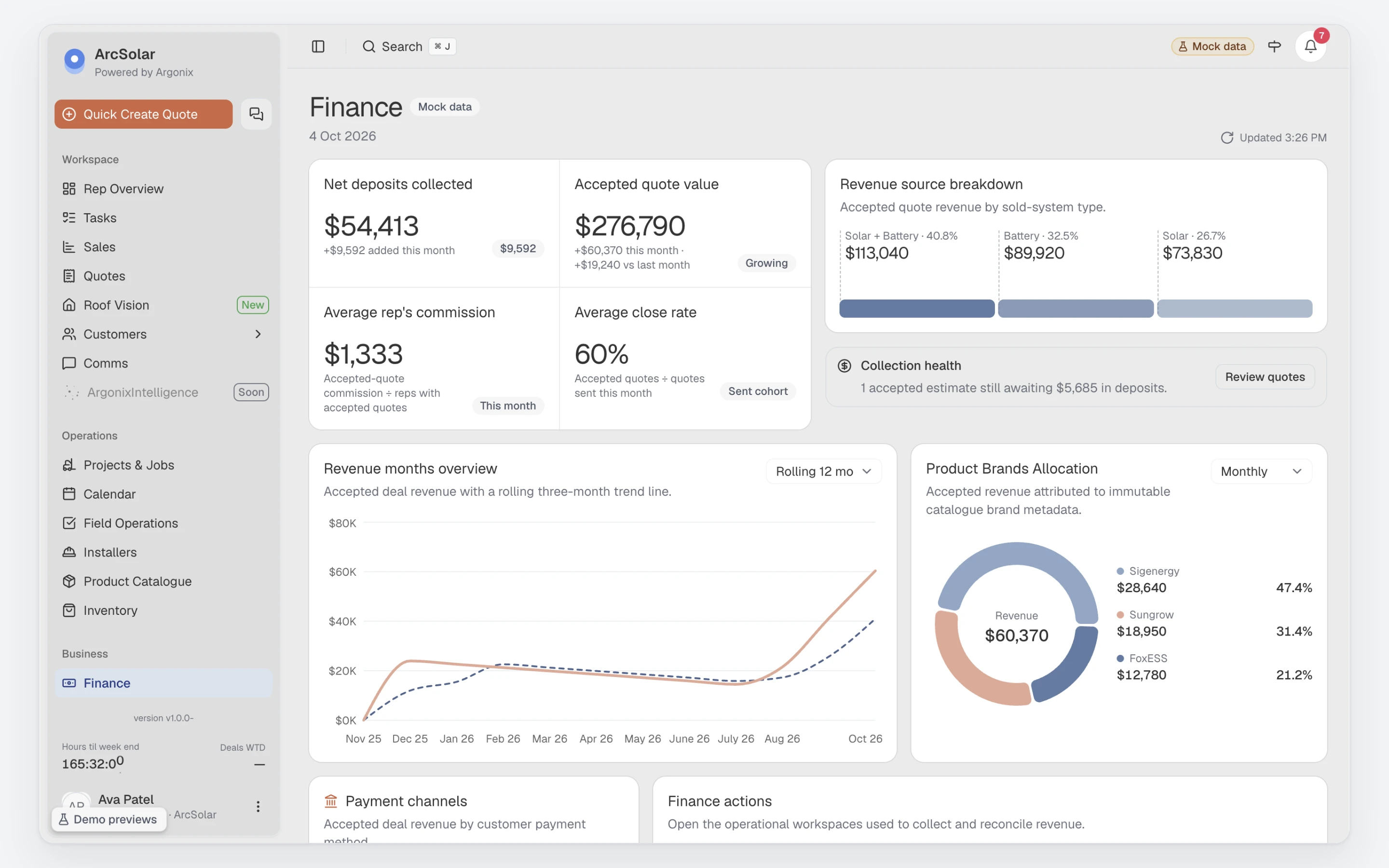
Finance
Review deposits, outstanding balances and payment status alongside the work your team is delivering.
Open Finance demo (opens in a new tab)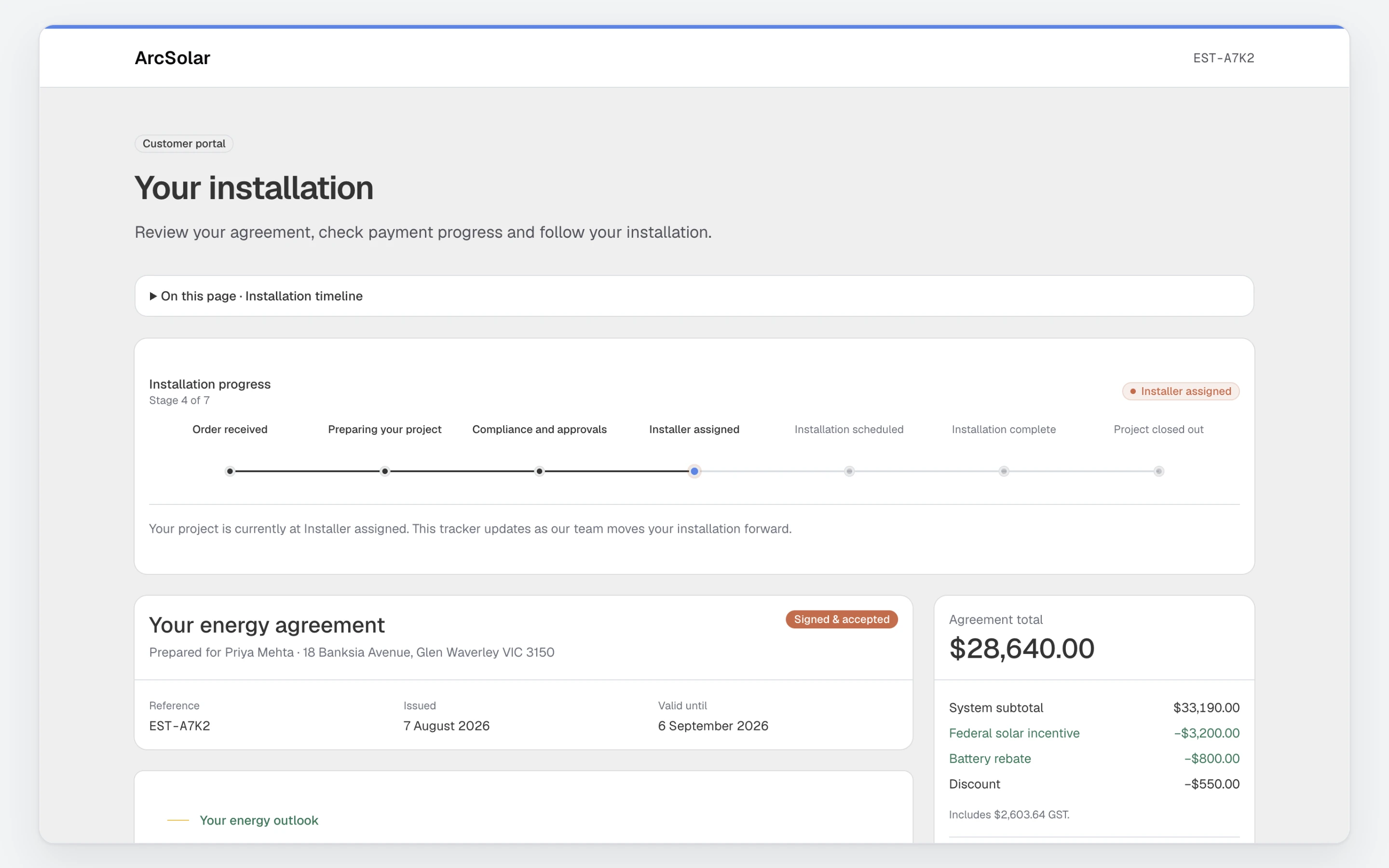
Customer tracking portal
Follow a sample installation at the installer-assigned stage, with the signed agreement and project progress in one place.
Open Customer tracking portal demo (opens in a new tab)Sources and review (34)
Published by ArcSolar. Examples are illustrative; product details come from the sources below. Editorial standards.
- SolarHub CRM features — SolarHub CRM; checked 5 October 2026.
- SolarHub customer communication capabilities — SolarHub CRM; checked 5 October 2026.
- SolarHub integrations and productivity tools — SolarHub CRM; checked 5 October 2026.
- ArcSolar AI bill analysis documentation — ArcSolar; checked 5 October 2026.
- ArcSolar CallIntelligence and automatic task documentation — ArcSolar; checked 5 October 2026.
- ArcSolar GreenDeal integration documentation — ArcSolar; checked 5 October 2026.
- ArcSolar Formbay integration documentation — ArcSolar; checked 5 October 2026.
- ArcSolar CRM — ArcSolar; checked 12 September 2026.
- ArcSolar customer payments — ArcSolar; checked 12 September 2026.
- ArcSolar sales to operations handover — ArcSolar; checked 12 September 2026.
- ArcSolar plans and scope — ArcSolar; checked 12 September 2026.
- OpenSolar project management and CRM — OpenSolar; checked 12 September 2026.
- Browser calls and SMS — ArcSolar; checked 12 September 2026.
- Connect GreenDeal — ArcSolar; checked 13 September 2026.
- Connect Formbay — ArcSolar; checked 13 September 2026.
- Rebate and certificate tracking — ArcSolar; checked 13 September 2026.
- AI electricity bill assessment — ArcSolar; checked 13 September 2026.
- Savings estimator — ArcSolar; checked 13 September 2026.
- CallIntelligence — ArcSolar; checked 13 September 2026.
- Feature availability — ArcSolar; checked 13 September 2026.
- Roof Vision and roof design — ArcSolar; checked 13 September 2026.
- ArcSolar-reported client implementation result and scope — ArcSolar; checked 13 September 2026.
- ArcSolar quote follow-up automation and communications — ArcSolar; checked 13 September 2026.
- Pylon design, CRM add-ons and pricing — Pylon; checked 5 October 2026.
- OpenSolar project management CRM — OpenSolar; checked 5 October 2026.
- OpenSolar free core and optional services — OpenSolar; checked 5 October 2026.
- OpenSolar Bridge Select STC connection — OpenSolar; checked 5 October 2026.
- PipeReply packages, integrations and implementation — PipeReply; checked 5 October 2026.
- Aurora design plans and enterprise integrations — Aurora Solar; checked 5 October 2026.
- ArcSolar Spark, Arc and Grid plans — ArcSolar; checked 5 October 2026.
- ArcSolar browser calling and SMS — ArcSolar; checked 5 October 2026.
- ArcSolar Roof Vision drawings and customer documents — ArcSolar; checked 5 October 2026.
- ArcSolar provider evidence and rebate settlement — ArcSolar; checked 5 October 2026.
- ArcSolar plans, permissions and release availability — ArcSolar; checked 5 October 2026.